Site Under Maintenance

Sorry for the inconvenience

Thank You For Visiting.

Showing posts with label iOS. Show all posts

Monday, 4 April 2016

Open Source GPS Tracking System: Traccar


Traccar is an open source GPS tracking system for various GPS tracking devices. This Maven Project is written in Java and works on most platforms with installed Java Runtime Environment. System supports more than 80 different communication protocols from popular vendors. It includes web interface to manage tracking devices online… Traccar is the best free and open source GPS tracking system software offers self hosting real time online vehicle fleet management and personal tracking… Traccar supports more than 80 GPS communication protocols and more than 600 models of GPS tracking devices.


To start using Traccar Server follow instructions below:
  • Download and install Traccar
  • Reboot system, Traccar will start automatically
  • Open web interface (http://localhost:8082)
  • Log in as administrator (user – admin, password – admin) or register a new user
  • Add new device with unique identifier (see section below)
  • Configure your device to use appropriate address and port (see section below)

Device Unique Identifier

For most devices you should use IMEI (International Mobile Equipment Identity) number as unique identifier. However, some devices have vendor specific unique identifier, for example TK-103 devices use 12-digit identifier.

If you don’t know device identifier you can configure device first and look at server log file. When server receives message from unknown device it writes a record containing unique identifier of new device. Look for records like “Unknown device – 123456789012345”, where 123456789012345 is your device identifier.

Address and Port

To host Traccar server your computer must have public IP address. Most ISPs provide such feature for extra fee.
To select correct port find your device in the list of supported devices. If you own a cheap Chinese GPS tracker please read this information. Port column of corresponding row contains default port number for your device. If you want to use different from default ports you can change them in the configuration file.


Traccar web interface supports multiple different map tile servers. Default map layer can be selected for the whole server by an admin user. Server-wide setting can be overridden for each user. Below you can find more information about all map layers available in Traccar GPS tracking server:

OpenStreetMap

OpenStreetMap (OSM) is a collaborative project to create a free editable map of the world. OSM layer is the default one in Traccar. It’s completely free, doesn’t require any API keys and can be used for any commercial purposes.
Quality of map data varies in different areas because most of the data is collected by volunteers performing systematic ground surveys using tools such as a handheld GPS unit, a notebook, digital camera, or a voice recorder. Some government agencies have released official data on appropriate licenses which increases the quality in some geographical areas.

Bing Maps

Bing Maps is a web mapping service provided as a part of Microsoft’s Bing suite of search engines and powered by the Bing Maps for Enterprise framework. It requires API key and subject to Microsoft terms and conditions for the service. API key can be set in the server settings.
Two layers are available:
  • Road view – displays vector imagery of roads, buildings, and geography
  • Aerial view – satellite imagery

Custom

Custom layers allows Traccar to use any tile server to retrieve map tiles. It requires URL in special format set in the server settings by admin user. Note that map data provided by third parties is a subject to terms and conditions and in some cases it might be illegal to use third party tile server without special permission or license from the service provider.

Custom map layer will be available starting from Traccar version 3.2.

Examples of tile servers:
  • Google Road:
    http://mt0.google.com/vt/lyrs=m&hl=en&x={x}&y={y}&z={z}&s=Ga
  • Google Satellite:
    http://mt0.google.com/vt/lyrs=s&hl=en&x={x}&y={y}&z={z}&s=Ga
  • ArcGis Topo:
    http://services.arcgisonline.com/ArcGIS/rest/services/World_Topo_Map/MapServer/tile/{z}/{y}/{x}.png
  • ArcGis Imagery:
    http://services.arcgisonline.com/ArcGIS/rest/services/World_Imagery/MapServer/tile/{z}/{y}/{x}.png
  • Yandex (not supported yet because of the different projection – EPSG:3395):
    http://vec04.maps.yandex.net/tiles?l=map&v=2.26.0&x={x}&y={y}&z={z}&lang=ru-RU


Traccar Client

Turn any smartphone into a GPS tracker

Source & Download

https://www.traccar.org/download/

Friday, 11 September 2015

Top 10 New Features of iPhone 6s And iPhone 6s Plus


On Wednesday, Apple unveiled the latest refresh to the iPhone lineup: the iPhone 6s and the iPhone 6s Plus. Being an 's' upgrade, both the new iPhone models largely look largely identical to their respective immediate predecessors (iPhone 6 and iPhone 6 Plus), but both the new iPhone models come sporting new hardware capabilities, and a bunch of software features that are exclusively available for the new models.

"The only thing that's changed is everything," said Tim Cook, Apple CEO on Wednesday as he announced the two new iPhone models. Regardless of which iPhone generation you currently use (or whatever Android handset you rock), the new features offered on both the iPhone 6s and the iPhone 6s Plus might be enough to entice you to upgrade. Here are top 10 features that the new iPhone models offer.

1. 3D Touch


Apple announced at the event that both the iPhone 6s and the iPhone 6s Plus come with Retina displays that support 3D Touch. The pressure-sensitive touch technology allows the handset to distinguish between a quick tap and a long press, triggering actions accordingly. The idea is that when you long press on an app's icon, you're now bestowed with several contextual options that could act as shortcuts and let you perform tasks quickly without actually opening the app first. You can, for instance, know direction to your home, listen to the album you like, update your Facebook status, as well as take a quick selfie camera without opening the corresponding apps.


2. iSight camera improvements - 12-Megapixel and 4K


Both the new iPhone models come with improved cameras, upgrading the resolution from 8-megapixel to 12-megapixel. The range of the iSight camera has increased, and the colour accuracy has also improved, said Phil Schiller, Apple's Senior Vice President of Worldwide Marketing. The company promises that it hasn't made any trade-off for increasing the megapixel count. To keep the noise low, the company introduced something called "deep trench isolation" which makes the photo diodes separate and deliver precise colour.

There's a new flash as well, which the company said adjusts to the colour and lighting of its surroundings to offer accurate flash. The new 12-megapixel rear camera now lets you record videos in 4K video resolution, a significant improvement from FHD quality (1080p) in several older iPhone models.

3. FaceTime camera improvements - 5-megapixel and 720p HD


The selfie camera is finally getting an improvement on the iPhone models. The company has upped the megapixel count from 1.2-megapixel to 5-megapixel on both the iPhone 6s and the iPhone 6s Plus models. The iSight camera is getting a new flash as well. Instead of introducing a separate sensor, the company said that the front display will flash for a split second.

4. Live Photos


The new iPhone models are now capable of capturing Live Photos. The company said that it is bringing life to the static photos that we all take. By "live" it means that a static image will capture a second and a half before and after the image is shot to show continuity. One could set this as a wallpaper as well.


5. Faster Touch ID 

The company has also made refinements to Touch ID, its fingerprint scanner that allows one to unlock the device, feed password to accounts, and facilitate quick Apple Pay payments with simply putting the finger on the sensor. 

The company said Wednesday that the Touch ID is now twice as fast, and more accurate as well.

6. More LTE bands  

Apple has also upped the network capabilities of the iPhone, adding support for several LTE bands. The iPhone 6s and the iPhone 6s Plus now support up to 23 LTE bands, which is the most in any smartphone. The Advanced LTE in the new iPhone models, among other bands, supports T-Mobile's 700MHz, confirmed the carrier's CEO. It will support speeds of up to 300Mbps.

7. Faster Wi-Fi 

The company, while didn't discuss the technical improvements to the wireless adapter chip, announced that it is improving the Wi-Fi capabilities of the device. The device now supports two spatial streams for up to 866Mbps on 5GHz 802.11ac Wi-Fi.

8. A9 processor 

The processor inside the iPhone is getting an upgrade too, of course. The new iPhone models come with the Apple A9 SoC, which is claimed to deliver 70 percent faster CPU performance than the A8 processor on the iPhone 6 and iPhone 6 Plus, and 90 percent faster GPU performance. The M9 coprocessor among other things, supports "Hey Siri" always-on voice search.


9. Rose Gold colour variant, and 7000 series aluminium body 

The company received a lot of flak last year when several users reported that their iPhone 6 Plus and the iPhone 6 were bending. Apple has quietly addressed that with a sturdier aluminium body - featuring 7000 series aluminium-zinc wrought alloy, the same used in the Apple Watch Sport edition.


10. iOS 9 

The iPhone 6s and iPhone 6s Plus ship with iOS 9, Apple's latest iteration of its mobile operating system. It brings several new features, from proactive assistance and new and improved Siri features, to a brand new Notes app, revamped Maps app, and the News app.


Sunday, 24 May 2015

iOS, Android or Windows Phone. Which is Better?

Here is a look at the new spot at each of these platforms offers us. So, you get points to Compare and define which one fits your needs. So, let’s see iOS or Android or Windows phone.


iOS 8, the ‘smart’ redesign Apple

iOS is known for being a friendly and intuitive operating system, with 1.2 million apps in the App Store. The improvement from the iOS 7 is lower, but helped in improving of user experience. These are some of its advantages.


Perfect Ecosystem: 

One of the highlight of the Apple family is that its ecosystem works perfectly. IPad, Mac, iPod, iPhone and Apple TV communicate with each other smoothly. iOS 8 takes this integration to a new level.


Calls from any device:

iOS 8 lets you to make and receive calls from an iPad or from a Mac. The condition is compatible with iOS 8 and are connected to the same WiFi network of the iPhone.


Share family:

iOS 8 includes a feature that allows users to share applications, songs, movies, books and podcast, among others, with other family members. Each family has an “organizer” who will add you or delete members of the group and makes the payments for the contents.


iMessage: 

The iMessage messaging system only works in the Apple universe. Now integrated with other devices and allows to send voice messages.


Bulletproof:

An advantage of iOS is that it is very safe. According to Kaspersky Labs, 98 percent of malicious codes are created for Android. Less than 1 percent affects Apple platform. This reflects, in particular, for two reasons: the controls exercised by the apple app store are very rigorous and is a closed system, which hinders the creation and spread of viruses on this platform.

Lollipop, ReEngineering

Single interface:

This will be your biggest change. It is an interface called Material Design (Design Material), which is at 60 frames per second, with layers and shadows in high definition. It gives the user a feeling of operation that is never felt nor seen before. It is very fluid, natural and showy runs, looking very surprising. It will be the biggest redesign of appearance in the history of Android. It includes new customization options too. 


Multitasking in tabs: 

The new operating system from Google, which is in line with names related to the goodies so called as Lollipop (Columbian) code – mimics the Chrome browser to provide a display of running applications. By clicking the icon ‘recent apps’ get a deployment tabs to jump from one to another, closing, etc. 


Battery:

Lollipop integrates ‘Volta Project’ say the next big thing to improve energy autonomy of mobiles. This feature helps developers to optimize energy consumption of their apps. It also includes a battery saving feature that promises to extend the duration to 90 minutes, compared to the current Android. 

Pay calm to his ‘smartphone':

The function of multiple users incorporates several improvements. With the mode of ‘guest’, or by creating or profiles, it is now possible that your phone or tablet with multiple user accounts that protect data, apps and content of each.
 

Backup and configuration:

Copying iOS, but improved. With the new setup wizard is much easier to retrieve user information, such as Google and mobile applications when you change a new one. Take your old phone or tablet, turn on the NFC, turn on your new phone, move them closer and ready. All your settings, accounts, data, etc., from one side to another. It is very simple to transfer your data from old mobile to new one.

Windows Phone 8.1, upward

The mobile operating system from Microsoft has positioned itself as the third most used worldwide, down from Android and iOS. In Colombia it has a special user base, through the impetus of Nokia Lumia and smartphone models input, i.e., affordable prices. Some of the main strengths of Windows Phone are part of their ability to interact with other computers and Microsoft ecosystem services, such as Office, Outlook and Xbox, which adds points to the operating system. These are some of the new features: 

Action Center: 

One improvement that allows windows phone for better manage and control the system notifications: emails, messages, missed calls, trills, social network updates, easy and handy. Very similar to Android (unfold sliding the top of the screen down), now include access to specific functions of mobile as networking and connectivity, among others. 

Best camera:

It is now possible to shoot burst style and add multiple ‘ apps’ for editing photos and videos, in addition to those already brings factory equipment. Along with Carl Zeiss optics Nokia has on their computers, Windows Phone makes it one of the best phones to take pictures and videos. 

Universal applications: 

From this year, developers have the ‘Universal App’ function, which allows you to create programs that run on any computer ecosystem Microsoft (Windows Phone, PC, tablets and Xbox One) , much like iOS, which means that you will see on your computer, console and mobile, the same application, no matter from which device you downloaded. 

Auto Wifi:

A function that has sparked controversy, but is quite useful. You should not be looking open WiFi. Windows Phone does, and is automatically configured when ‘hears’ a network for public use, leaving the mobile connected without intervention of the person.

Sunday, 4 January 2015

How to Hide Apps on iOS 8, 8.1, 8.1.1 & 8.1.2

The users of smartphone and smart devices are always remain more possessive about their security concerns. Since, there smartphones are easily approachable by anyone. However, the iOS users can overcome their concerns at great extent by hiding their security apps.

There are many apps on iOS devices which carry sensitive data of users, i.e; Banking Apps. So, friends today we are going to learn that, “How to hide apps on iOS 8, 8.1, 8.1.1, and 8.1.2?” By applying this guide you can easily hide yur favorite, private or sensitive apps from the approach of your child or your friend.

Learn-How to Hide Apps on iOS Devices

Here are the steps which you need to apply to hide your favorite apps. This is the piece of writing which is going to make you learn that, “How to hide apps on your iOS devices?” These are the simple steps to be followed to get the solution.
  • First of all, shift your app to the home-screen which you want to hide
  • After that tap and hold your app which you want to hide until it creates a new folder for it
  • Now without lifting your finger, drag the app to the dock area
  • Then it will be hidden from your home-screen. To get it back, restart your device
  • This was it!

If you have found this guide helpful and worth reading then do share this with your other friends and circle too. Your share may be proven helpful for your friends and circle.If you have any kind of questions or queries left then do let us know. We shall try to get back to your queries as soon as possible.

Thursday, 18 December 2014

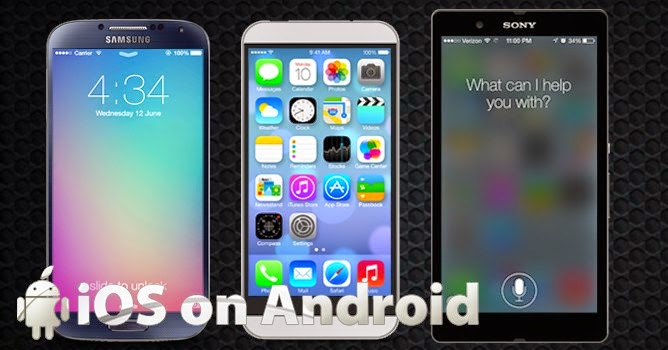
iOS on Android: How To Run iOS Operating System on Android Devices?

There are very large number of people who can afford to buy an iPhone but they go for Android phone instead of an iPhone because Apple put several limitations with iPhone. As the price of Apple iPhone is very high (many people say “overpriced”) so with so many limitations at such high price, people just can’t survive.
However, the user-interface is quite appealing and iOS available in iPhone provide several amazing features that Android devices can’t match. So basically, what people want is “An iPhone that’s not made by Apple”.

Do you also fall in same category of people who wanted to enjoy iOS features but not on Apple devices?Then, I’ll just say you dream have come true (and, I am not kidding).Talented XDA Developers have made it possible.
They have made it possible to run iROM (a port of iOS) to run on Android firmware using an “iOS virtual machine emulator”. Although, it is a workaround so you will miss few new features but it is providing several features:

What It’s Got?

Installing iROM on your Android phones or tablets will provide you several iPhone’s features on your Android devices. Some notable features are as follows:
sonymobilexperiaureview

1. iOS Notification Center

While using any app, if you got any email or message then instead of popping it right on your screen, iOS Notification Center will show a little summary of message through a small bar that appears at the top of your screen. If you swipes it down, you’ll get a list of all the “notifications” you have received. Just tap the message, and you’ll be taken to your inbox.

2. Tweet From Any App

How many time it happened that while browsing web, you have found interesting content that you want to share with your twitter friends or followers? (May be, you wanted to tweet about this review!)
So now, instead of installing any separate Twitter app, you can tweet the content directly to your friend by tapping the “Tweet” option available at your web browser. Tap Tweet, add message and tap “send”. You tweet will be instantly sent to your Twitter feed.

3. Easy Camera Access

Not just the unlock feature got iOS’s patented slide-to-unlock features but it also have a shortcut to access your camera app. Just swipe up and you’ll be taken to your default camera app to shoot pictures. Moreover, you don’t need to “tap”, even you don’t need to touch screen at all to take pictures. You can shoot the photos by pressing Volume up button.

4. Customizations

Due to iROM, you can change your background wallpaper, lock screen wallpaper and ring tone to that of iPhone. Isn’t it cool?

5. One Size Fits All App

One of the great strengths of iOS is, all the apps perfectly fits iPhone screen so in contrast with Android developers, iOS developers can easily provide consistent UI for iOS devices without concerning about screen sizes. Now, with iROM, you have this feature for your Android apps too. So developers, just take care of UI, screen will automatically adjusted.

What It’s Lack?

Well, its only iROM running on your Android so it obviously lack some features. Not important, though, but it lacks Apple App Store and Siri.

How to Save and Improve iPhone Battery

Battery draining is a major problem with iOS device. Whether you are using iPhone, iPad or iPod the battery doesn’t works the same as it was working when you bought it. Initially, when your device is new battery performance and power backup is very good but after 6-8 months you will find its performance deteriorating.


Well, there are certain steps you can take to save and improve your battery performance. This can help you in crucial times when you need your phone’s battery the most.
Here, we are listing certain powerful steps that can actually help you.

1. Turn off location services

Location services consume your phone battery at a very fast rate. It’s a good option to turn your location services off when you are not using them through any app. Turning off GPS saves your battery power a lot.
For this, under the settings option go to privacy>location services. You will find slider options to turn the location services on/off. Either turn off location services for all the apps or for individual apps as you wish.
location services

2. Turn off as maximum notifications

You get notifications for mails, messages, IM apps notifications etc. Turn off as many notifications as you can. They drain your battery. If you do this then even with your WiFi and Bluetooth on you will find less battery draining.
Disable app notifications except the important ones. Go to the setting menu and then under Settings go to Notifications. Tap category or app. You will again see toggle button and then disable the ones which are less important or are not important at all. This will increase your standby time.
Try to check your email, Facebook, Twitter manually. Push emails also drain your battery.
notifications

3. Turn off Airdrop when not required

iPhones now come with airdrop that helps in sharing files, photos or videos with friends when they are close or in range. But it implements heavy toll on your battery. So, try to keep it off when you have no use of it.

For this, go to the Control Center and tap Airdrop, under that select off and you are done. Whenever you need it again, simply turn it on.

4. Check for Updates and Disable auto updates

We have so many apps in our iPhone and they keep on updating very frequently. Disable auto updates of apps. Try to update your apps manually.
Updating your apps is also beneficial as the newer versions. The newer versions of apps are generally more optimized and they try to do their work by using as less battery as they can. So, go for updates manually whenever you find time.
update apps

5. Use Battery Saver and optimizer apps

There are a number of battery saver and optimizer apps available in the iTunes. Most of them are available for free, some are charged. These apps do a lot of functions to save your battery. They keep track of the background activities, screen brightness, WiFi when your screen is lock etc.
They are quite powerful. Some of them actually extend your battery life.

6. Turn off WiFi and Bluetooth

WiFi and Bluetooth suck your battery. Don’t keep them on all the time. Turn them on only when you need them otherwise keep they off. It will preserve your battery. Go to the Control Center and turn it off.

7. Minimize Background Apps

A number of apps keep on running in background. Some of them are useful while some others are useless. So, our advice is try to minimize the number of background apps and save battery
background app

8. Turn on Airplane Mode while charging

If you want to charge your phone at super fast speed then turn on airplane mode. iPhone gets charged very fast in airplane mode. This can help you when your phone battery is very low and you need charge. Airplane mode disables radio signals so it can charge your phone at great speed.

Battery Booster Apps for your iPhone/iPad/iPod Touch

Does your iOS device gets too much battery drain? It is not performing as good as it was performing when you bought it? Actually, battery performance of iOS device decreases over time. It does not gives the same performance it used to give when it was new.


Fortunately, we have many effective apps that can help in improving our iOS battery life. We have collected 5 best apps to increase your battery performance. These apps are compatible with iPhone/iPad/ iPod touch.

1. Battery Life Magic Pro ($0.99)

 Battery Life Magic Pro improves your device battery by running full charge cycles and it also provides some tips to help you improve your battery performance. This app is compatible with iPhone, iPad and iPod Touch of iOS 6.0 or later.
It tracks your full charge history and displays battery usage for different activities. It optimizes your battery life and reduces battery drain by providing effective tips and battery saving options. Shows how much power you have for each activity based on your current battery charge.
battery life magic pro
I particularly liked its UI. The display graphics are good and easy to understand. Even children can use this app in their iPods.

2. Battery Pro ($0.99)

Battery Pro provides you various information about your battery like status, usage, remaining, tips etc. Depending on your device and its capacity the app will show you remaining usage time.
It monitors the processes which are running in the background and how much battery they are using. It keeps tracks of your battery charge time, charge log, type and remaining capacity. For better use of your battery, it provides many effective tips. It requires iOS 5.0 or later and is compatible with iPhone, iPad and iPod Touch.
battery pro

3. Battery Booster Max (Free)

Battery Booster Max is a free app that helps you maximize your battery performance. It provides effective tips to maximize your iPhone, iPad or iPod battery life.
This way you can use your battery for more game play, video playback, audio, web browsing or for other usage. For more tips, battery logs, maintainance etc. upgrade this app to Battery Magic Pro.
battery booster max

4. Battery Box 3-in-1 (Free)

This Box 3-in-1 is a free app that contains 3 useful battery apps inside to increase your battery life. If your battery is not lasting as long as when you first got your iPhone/iPad then you need to completely drain your battery and then charge it fully. This is the only app that can charge and drain your battery.
This app provides you powerful tips to optimize your battery. Keep track of your battery status while using talk time on 2G/3G, internet, WiFi, time to charge etc.
battery box 3-in-1

5. Battery Magic Elite ($0.99)

Battery Magic Elite is another great app to maximise battery life and increase battery usage. It has a dynamic dashboard that shows charging precision to 1.0% increment. It shows you full charge and topping charge and gives you alert when charging is complete.
There are various battery status indicators. Magic Elite monitors charging over 20 conditions. Tells you how much talk time you can have, internet browsing, audio or video playback time etc. You can also build your own battery photo themes.
battery magic elite

Get WhatsApp on your Android Device for a Lifetime – Here’s How to Go about It


WhatsApp is among the most popular mobile phone messengers used by millions of people across the globe.
This IM is available for all users of the Android and iOS devices and it can be downloaded from Google Play Store or Apple Play Store. Furthermore, users of other mobile operating systems like BlackBerry, Symbian and Nokia can also download and install this app on their devices.
As much as WhatsApp is the most popular instant messaging app across the globe, it is not a free app. Users of this app must pay a fee after using it for a period of one year. However, as you’ll soon find out, this is not applicable to every user of this application.
WhatsApp is not the only instant messenger in the market today, there are many other players in this field and quite a number of them offer even many advanced services than WhatsApp; they are entirely free to download and use for a lifetime, without any charges, yet they have less popularity when compared to what WhatsApp has.
The reality is that many people like the sound of ‘free’ but in the case of WhatsApp, it’s very different. Maybe it can be assumed that a large percentage of the millions of users of WhatsApp are still on their first year of subscription. If it’s so, then you’ll need to know a few tricks so that when the time comes, you can make use of them and get free WhatsApp on your Android device for a lifetime.
Change your Mobile Phone Number
During the WhatsApp registration process, users are usually asked to provide their phone number. WhatsApp stores this number as your identity for the whole period you’re subscribed to the app. What this means is that if in any case you wish to extend your usage of this app past the first free one year trial period, you cannot do so using this already recognized number.
In order to extend the subscription period of your app to last a lifetime, start the app and go to “Settings” and from there, select the “Account” option and then “Change Number”. After pressing the “Next” button at the upper right of your screen, you’ll immediately see two boxes; one with the current WhatsApp number and a second box where you should enter your new number.
Press “Continue” after you are done entering the new number and it will be automatically added to WhatsApp database as your new number. In this way, you will have an extended period of using WhatsApp for another year. You can repeat this process yearly and WhatsApp will never incriminate you for it.
Using an iPhone for Free Lifetime Registration
One funny and rather weird thing is that WhatsApp for iOS is free and can be downloaded from iTunes and used for a lifetime without charge. So, you can still have WhatsApp on your Android device, but you’ll need to complete the registration process using an iOS device, preferably an iPhone.
You can buy an iPhone or borrow one from a friend or relative. If borrowing, make sure your friend makes a backup of their WhatsApp conversations and then uninstall their already installed WhatsApp. You don’t have to take this route if you bought a new iPhone. In addition, make sure you delete your existing account with WhatsApp before you begin this process.
Download the free app from iTunes App Store and follow through the registration process as usual. Your number will now have a free WhatsApp registration that will last a lifetime. To confirm the status of your account, go to Settings > Account > Payment Information; this is of course after switching back to your Android device.
Delete WhatsApp Account
When a WhatsApp account is deleted, it is removed from the app’s database and as such it’s deregistered. You can do this and re-register your phone number and you’ll have another year of using WhatsApp. To do this, go to Settings>Account>Delete Account.
The flipside of using this method is that all your conversations will be deleted, thus; you should backup your data before you delete an account and once you are done, you can restore it.
Let WhatsApp Expire
Once the one year free usage ends, wait for at least five days for the app to recognize that your number is dormant. WhatsApp will grant you an extended period of a few months as you ponder over how to extend the usage of the app.
During this time, you can try any of the above mentioned tricks or instead, you can still opt for another app that is available for free; for instance, Line, WeChat or Viber and still keep in touch with friends.
Join Our Newsletter