Site Under Maintenance

Sorry for the inconvenience

Thank You For Visiting.

Showing posts with label Microsoft. Show all posts

Monday, 4 April 2016

Open Source GPS Tracking System: Traccar


Traccar is an open source GPS tracking system for various GPS tracking devices. This Maven Project is written in Java and works on most platforms with installed Java Runtime Environment. System supports more than 80 different communication protocols from popular vendors. It includes web interface to manage tracking devices online… Traccar is the best free and open source GPS tracking system software offers self hosting real time online vehicle fleet management and personal tracking… Traccar supports more than 80 GPS communication protocols and more than 600 models of GPS tracking devices.


To start using Traccar Server follow instructions below:
  • Download and install Traccar
  • Reboot system, Traccar will start automatically
  • Open web interface (http://localhost:8082)
  • Log in as administrator (user – admin, password – admin) or register a new user
  • Add new device with unique identifier (see section below)
  • Configure your device to use appropriate address and port (see section below)

Device Unique Identifier

For most devices you should use IMEI (International Mobile Equipment Identity) number as unique identifier. However, some devices have vendor specific unique identifier, for example TK-103 devices use 12-digit identifier.

If you don’t know device identifier you can configure device first and look at server log file. When server receives message from unknown device it writes a record containing unique identifier of new device. Look for records like “Unknown device – 123456789012345”, where 123456789012345 is your device identifier.

Address and Port

To host Traccar server your computer must have public IP address. Most ISPs provide such feature for extra fee.
To select correct port find your device in the list of supported devices. If you own a cheap Chinese GPS tracker please read this information. Port column of corresponding row contains default port number for your device. If you want to use different from default ports you can change them in the configuration file.


Traccar web interface supports multiple different map tile servers. Default map layer can be selected for the whole server by an admin user. Server-wide setting can be overridden for each user. Below you can find more information about all map layers available in Traccar GPS tracking server:

OpenStreetMap

OpenStreetMap (OSM) is a collaborative project to create a free editable map of the world. OSM layer is the default one in Traccar. It’s completely free, doesn’t require any API keys and can be used for any commercial purposes.
Quality of map data varies in different areas because most of the data is collected by volunteers performing systematic ground surveys using tools such as a handheld GPS unit, a notebook, digital camera, or a voice recorder. Some government agencies have released official data on appropriate licenses which increases the quality in some geographical areas.

Bing Maps

Bing Maps is a web mapping service provided as a part of Microsoft’s Bing suite of search engines and powered by the Bing Maps for Enterprise framework. It requires API key and subject to Microsoft terms and conditions for the service. API key can be set in the server settings.
Two layers are available:
  • Road view – displays vector imagery of roads, buildings, and geography
  • Aerial view – satellite imagery

Custom

Custom layers allows Traccar to use any tile server to retrieve map tiles. It requires URL in special format set in the server settings by admin user. Note that map data provided by third parties is a subject to terms and conditions and in some cases it might be illegal to use third party tile server without special permission or license from the service provider.

Custom map layer will be available starting from Traccar version 3.2.

Examples of tile servers:
  • Google Road:
    http://mt0.google.com/vt/lyrs=m&hl=en&x={x}&y={y}&z={z}&s=Ga
  • Google Satellite:
    http://mt0.google.com/vt/lyrs=s&hl=en&x={x}&y={y}&z={z}&s=Ga
  • ArcGis Topo:
    http://services.arcgisonline.com/ArcGIS/rest/services/World_Topo_Map/MapServer/tile/{z}/{y}/{x}.png
  • ArcGis Imagery:
    http://services.arcgisonline.com/ArcGIS/rest/services/World_Imagery/MapServer/tile/{z}/{y}/{x}.png
  • Yandex (not supported yet because of the different projection – EPSG:3395):
    http://vec04.maps.yandex.net/tiles?l=map&v=2.26.0&x={x}&y={y}&z={z}&lang=ru-RU


Traccar Client

Turn any smartphone into a GPS tracker

Source & Download

https://www.traccar.org/download/

Wednesday, 24 June 2015

WebAssembly — New Standard for Powerful and Faster Web Apps

WebAssembly — New Standard for Powerful and Faster Web Apps
Google, Apple, Microsoft, and Mozilla have joined hands to create code for use in the future web browsers that promises up to 20 times faster performance.

Dubbed WebAssembly (or wasm for short), a project to create a new portable bytecode for the Web that will be more efficient for both desktop as well as mobile web browsers to parse than the complete source code of a Web page or an application.

Bytecode is actually a machine-readable instruction set that is faster for web browsers to load than high-level languages.

WebAssembly — A New File Format to Compile Code


At the moment, browsers use JavaScript to interpret the code and allow functionality on websites such as dynamic content and forms. By default, JavaScript files are downloaded from the server and then compiled by the JavaScript engine in the web browser.

However, improvements have been made to load times via Asm.js — the stripped-down JavaScript dialect described as an "assembly language for the web" — but bytecode-based systems such as .NET are faster and enable efficient compilation.

WebAssembly will introduce a new file format that will allow developers to compile their code to a binary notation, which will then be executed inside each browser's (e.g. Chrome, Firefox, IE/Edge, Safari) JavaScript engine.

If introduced as a standard implemented in all web browsers, WebAssembly could surely bring app-like performance to Web content as well as applications.

Over 20% Faster Performance


Preliminary tests already show that the binary representation is 23 times faster to parse than similar JavaScript applications optimized through Mozilla's widely supported asm.js for browsers, and 20 to 30 percent smaller than its actual file size.
"I'm happy to report that we at Mozilla have started working with Chromium, Edge and WebKit engineers on creating a new standard, WebAssembly," said Mozilla developer Luke Wagner,"that defines a portable, size- and load-time-efficient format and execution model specifically designed to serve as a compilation target for the Web."
Currently, only C and C++ code can be compiled into a WebAssembly (a.k.a wasm) file.

Moreover, the developers of wasm know that JavaScript is supported everywhere so for older web browsers, they are providing a polyfill — a JavaScript script that will convert WebAssembly bytecode into asm.js for those browsers that don't support wasm.

WebAssembly is still in its early days of development with no formal standards as of now. The specifications and the high-level design has also not decided yet, but with all four major browser developers working together, wasm should appear soon.

The future possibilities for WebAssembly file format are being explored on GitHub page. However, a new WebAssembly Community Group has already been formed by the World Wide Web Consortium (W3C), which is open for anyone to join. These are FAQs that will give you more details on the group plans.

Source www.TheHackerNews.com

Tuesday, 23 June 2015

Facebook, Microsoft gear up for Virtual Reality: Is it the next big thing?

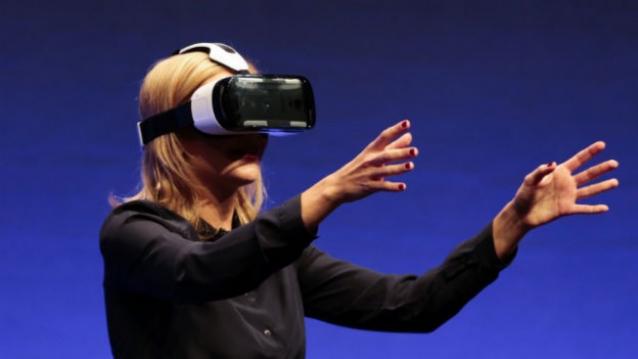
British television presenter Rachel Riley shows a virtual-reality headset called Gear VR. AP

After years of ground work, it seems the battlefield for virtual reality is finally gearing up.
While Google, Samsung and Facebook are racing to be the first to launch their respective products, others like Microsoft have already managed to impress many with the Hololens. After all, virtual reality seems enormous and very promising. Imagine, putting on a pair of goggles or headgear, and being transported into a different world. The man-meets-machines kind, but everything stays within your mind. Now, doesn’t that sound cool?
“Interest in Head Mounted Display devices, which power virtual reality (VR), augmented reality (AR) and other smartglass apps, will be such that, by 2018, the technology behind them will be used in a variety of consumer and business scenarios,” a Gartner report had said.
Image: TheVerge
Going beyond gaming. Image: TheVerge
The report added that HMD devices were more popular in 2014 than at any point in the past. Prior to that HMDs were mainly found in certain apps like industrial design, military training and likewise. Needless to say, Facebook’s acquisition of Oculus in 2014 played a major role in bringing this change.
There is a long history of the development of the technology, but will stylish eyewear ensure broader adoption of the technology. It leaves several such answered questions. Let’s take a look at them, one by one.
Going beyond gaming
The world of virtual reality is synonymous with gaming. “Virtual reality is primarily focused around gaming because it is the most immediate application that can be monetised,” Shiv Putcha Associate Director, Consumer Mobility & AP Telco Strategies, IDC tells us. So, we’ve got technology that is futuristic, but there are not too many use cases that have a clear connect to money. It will need more ROI till people start investing more and more into it. However, the gaming base is a good way to kickstart the technology on the path to becoming mainstream. So, will it go beyond gaming? It is a little early to say if it will go beyond gaming. There are certain used cases, but it many not be really a business-focussed thing in the near future, he adds.
Mobile will drive VR, and vice versa
Today, dedicated hardware is required for virtual reality such as Oculus and so on. It doesn’t connect with a smartphone, tablet or console. In the gaming space, eventually, you can imagine an end-game where a VR headgear takes the place of the console, maybe.
The other possibility is it can be coupled to your device with some other hardware or app. For example, if you are on a headgear and taking notes, you will need a connection with a stylus or or other input mechanism. However, it is also possible that very few may really choose to wear a headgear. It is, therefore, quite likely that all devices may connect to the virtual reality but may not necessarily be wearables.
On the contrary, virtual reality could also drive mobile. It could be the reason for enhancements in processing power, chip capability, and other things that will have an affect once VR becomes mainstream. You smartphone could eventually become a hub for VR and connected devices.
Failed Google Glass: The first lesson?
It took years of groundwork and some interesting products before the smartwatch finally went mainstream. Other wearables such as goggles and glasses, will also follow a similar pattern. Google Glass was a high-profile launch, and its failure is bound to have at least some effect on similar wearables.
The Oculus Rift headset (AFP)
Augmented and Virtual Reality: Not the same thing
The two are way apart. Augmented reality is a mix of virtual reality and real life, allowing developers to create images within apps. Users can interact with both worlds and also distinguish between them. AR apps are already popular in the gaming world, and also otherwise. On the other hand, virtual reality is all about creating a virtual world and it is designed in such a way that people can’t really distinguish between virtual and real. To achieve VR, you usually need to wear a gadget such as glasses or helmet that support the functionality.
Google Glass didn’t get much traction, but Google Glass wasn’t driving virtual reality. So, considering VR is a completely different ball game, we still doubt it would have a great impact. Nevertheless, a successful Google Glass could have made things a little easy.
Android power play
Google is rumoured to be working on its own technology for VR. Now, it won’t be surprising if there is a version of Android for VR, after all its a very flexible OS. So, we’ve seen Android Wear, Android Auto and so why not an optimised version for this space?
One advantage – Google will make it available widely. All hardware manufacturers will have access to it. But it will take time, just like wearables that saw a lot of experimentation. “Eventually you will see new devices that will have an impact on the cost. So, will it be a $50 Android smartphone or a watch anytime soon? Probably not. It will follow a similar path, but a different curve,” explains Putcha.
VirtualReality_NEW
Will it be the next big thing?
Virtual Reality isn’t really the next fad and still has a long way to go. “It will be a few years before virtual reality becomes mainstream. It is just the beginning of the pretty long cycle of development and commercialisation of virtual reality. It isn’t a hype-driven feature that will go away, but rather a long-term thing,” Putcha points out.
The companion technologies are not quite there. To initiate or activate the device you need other things too including connectivity in usable form factor. People may look for other things that you see in smartphones and tablets, and not just the core virtual reality technology. So, unless all the different features don’t come together, it will struggle to go mainstream. You may not see a Google Glass kind-of form factor in a very small time, and still need to put on a sizeable headgear.
Now, even if the device capability and every other creased aspect is ironed out, the connectivity or bandwidth will play a crucial role. The VR device isn’t wired to your laptop, mobile or some other power source. It isn’t just about VR technology to make it a viable consumer proposition.
If it is aimed only at the enterprise segment, then customers may be willing to make certain tradeoffs like the cool quotient or form factor, but in the mainstream consumer market experience matters a great deal. Perhaps virtual reality is a big thing, it’s just not necessarily the next big thing.

Saturday, 20 June 2015

How Microsoft Can Spy On You And How To Stop It


This Article will explain how they spy on you and how you can stop Microsoft from getting your IP Address without your permission.

How Microsoft Can Spy On You?
The answer is simple, via their NCSI ( Network Connectivity Status Indicator ).

Why should we care of it?
Well... each time we start our Windows Computer an Internet connection test is run automatically to test the Internet availability.

So each time we start it, our PC makes a connectivity request to a text file into the NCSI Server of Microsoft ( 131.107.255.255 & dns.msftncsi.com ).

The Text file should be located here:
http://www.msftncsi.com/ncsi.txt

Where's the fun part?
Microsoft admitted that they DO NOT NOTIFY the user Before attempting to collect informations, infact it is automatically done if you have the Internet!.


 ...In short...

They store, in a NO-ENCRYPTED way, your logs into their WebServer, each time you connect. The logs contain the time of each access and the IP address recorded for that access.

Wanna See in Deep?? Look Below Here!
"User notification: [ NCSI does not notify the user before attempting to collect information. ] ... "

"Encryption and storage: [ NCSI does not use encryption ] ...

[ IIS logs are stored on the server at www.msftncsi.com. These logs contain the time of each access and the IP address recorded for that access. ] ... "

What did they say about it?
They said that "These IP addresses are not used to identify users, and in many cases, they are the address of a network address translation (NAT) computer or proxy server, not a specific client behind that NAT computer or proxy server."

Alright... So Someone may say that it is a service to help native users see a yellow icon if there is a limited connectivity. 

But... ask to yourself, why should Microsoft needs to get all these Personal Informations from Us (stored in that way)?.

Isn't a "Legal" Spy System? ... well , if you feel ashamed from all of this, we will teach you How to Block all that stuff!.

So, if you Wanna Block the Microsoft "Auto IP-Listening" Service? Act as below:

1) Open REGEDIT and press Enter

2) Go on HKEY_LOCAL_MACJONE

4) Click on SYSTEM

5) Click on CurrentControlSet

6) Click on Services

7) Click on NLaSvc

8) Click on Parameters

9) Click on Internet

10) On the right side look for "EnableActiveProibing" and set This Value to "0"


Done?! No, There's another way on how they can Track us, by using our Local Computer Policy Editor.

Wanna be more secure?
You'll have to deactivate the "Windows Network Connectivity Status Indicator active tests".

How can you do it? Follow these steps:

1) Search for gpedit.msc and click on it, the Local Computer Policy Editor will appear

2) Go here:
Local Computer Policy > Computer Configuration > Administrative Templates > System > Internet Communication Management > Internet Communication Settings

3) Look for "Windows Network Connectivity Status Indicator active tests" and turn it OFF.


**Still Worried?!** 

You can Manually Block the domains and the referred IPs directly from the HOSTS File!...

1) Navigate here:
c:\windows\system32\drivers\etc\hosts

2) Open the file with NOTEPAD or another Text Editor:

3) Paste these following lines at the end of the File:

127.0.0.1 msftncsi.com
127.0.0.1 131.107.255.255
127.0.0.1 dns.msftncsi.com

4) What's next? Of Course you must Save it!.

Congratulations! You have now stopped to send all your Connection Details to Microsoft!.

Wednesday, 13 May 2015

Microsoft Edge: The Windows 10 Web Browser

Microsoft-Edge-Windows10-Browser
Meet Microsoft’s replacement to its old web browser Internet Explorer. The Project Spartan Web browser for Windows 10 has now an official name — Microsoft Edge.

Yes, Microsoft’s new web browser shipping on all Windows 10 devices, from computers to smartphones and tablets, is dubbed Microsoft Edge.

The company just announced in its Build developer conference that Edge is going to be its primary/default web browser built into Windows 10.

Microsoft Edge is the successor to Internet Explorer and designed to be basic and minimalist for the future.

Highlights of Microsoft Edge:
  • There aren't many details about the unique features of Microsoft Edge yet, but here’s what we know about Microsoft Edge so far:
  • It has built-in Cortana support, Microsoft's virtual assistant.
  • It has a built-in reading list, web note-taking and sharing features.
  • The rendering engine is called EdgeHTML.
  • The design focuses on minimalism and simplicity.
  • It has a super useful and well-designed "New Tab" page (pictured below).
  • It contains the vast majority of the controls.
Introducing Microsoft Edge: The New Windows 10 Browser

"You are going to care about the blasting fast technology that's inside it," said Microsoft VP Joe Belfiore to the audience during the Build 2015 keynote.
However, the best news about Edge is that the browser will support web extensions designed for Firefox and Chrome with only "minor" code alterations needed.

There is no full-size screenshots have yet been released by the Microsoft officially. However, you can watch the video given below:


Check out the apparent logo for Microsoft Edge, which looks similar to its predecessor IE.
microsoft-windows-edge-browser

Saturday, 9 May 2015

Windows 10 is the Last Version of Windows, Microsoft Confirmed

Windows 10 is the Last Version of Windows
Microsoft just announced in its Ignite 2015 conference in Chicago that Windows 10 is set to be "the last version of Windows."

"Right now [we are] releasing Windows 10, and because Windows 10 is the last version of Windows, [we are] all still working on Windows 10," said Microsoft's developer evangelist Jerry Nixon while speaking at the conference this week.

What exactly does it mean? Will Microsoft not launch Windows 11 next? Is Windows 10 actually the end of Microsoft’s Windows operating system?

These are some questions that were ongoing in the mind of the audience when Nixon gave this statement during his speech.

The reaction from Microsoft was really alarming though you do not have to panic, as Windows OS is not dying.

Windows 10 — Brand Name of Microsoft's OS


For the moment, Microsoft will stick with Windows 10 and focus on smaller and faster updates to its Windows 10 platform, instead of launching new stand-alone versions of the operating system every few years.

This Microsoft's new approach is something similar to Apple's OS X, the Mac operating system that gets smaller updates on a yearly basis and has been known as OS X for over 15 years. Every new release of OS X gets a unique name with some major updates, but Apple didn't change the name of its OS.

Oh! Give me a break. If I take you back when it was decided by Microsoft that its next Windows version will be Windows 10 and not Windows 9. This could be a reason that Microsoft wants to stick with Windows 10 brand name for the near future.

'Windows as a Service'


Speaking to The Verge, the company confirmed plans to improve Windows 10 through regular updates though Microsoft has no plan to roll out a new version of Windows at some point in the future.

The future, the report notes, is "Windows as a service," although the company has yet not clearly explain it.

"Recent comments at Ignite about Windows 10 are reflective of the way Windows will be delivered as a service bringing new innovations and updates in an ongoing manner, with continuous value for our consumer and business customers," Microsoft spokesperson said in a statement.

"We aren't speaking to future branding at this time," the spokesperson added, however "customers can be confident Windows 10 will remain up-to-date and power a variety of devices from PCs to phones to Surface Hub to HoloLens and Xbox. We look forward to a long future of Windows innovations."

Windows 10 to be the Microsoft's major version of OS


There is no doubt that Microsoft have spend and have to spend an enormous amount of money in marketing to convince users that this new version is what they need and that Windows 10 is better than anything that had come to them before.

So far, it is unclear whether the tech giant will keep the Windows 10 moniker forever, but if it happens Windows 10 could mark an entire new chapter for Microsoft where Windows is more of a service, however, the company still needs to really launch the Windows 10 operating system first.
Join Our Newsletter