Site Under Maintenance

Sorry for the inconvenience

Thank You For Visiting.

Showing posts with label Android Hacking. Show all posts

Sunday, 28 December 2014

How to Hack And Bypass Android Password/Pattern/Face/PI Lock!!


Have you set your android phone pattern and forget what it was??Or want to hack someone else pattern lock,Well in this world there are lot of ways to do this...
However I Have listed some of the methods here...


(NOTE: You don't need rooted devices to unlock(However,it is better if the phone is rooted).

Both the methods are Applicable for any Android or tablet device.

Disclaimer:This article is for educational purpose only, don’t use to crack android pattern lock on other people’s phone without their permission


METHOD 1


Step 1: Enable USB debugging

First of all goto settings and developer options(If you don't see the developer option then go to about phone and tap build number multiple times.It should prompt that "you are the developer" ) and check the Android and USB  debugging option.


Techtechnik:SHIFT+Right CLICKStep 2: Download and Open ADB

Install  adb on your PC.
Now connect your phone to PC.
Open adb containing folder and hold "shift key of your keyboard and right click your mouseon the window empty space,then click open command window.

To check wheter device is connected type adb devices in cmd terminal..and it will show weather device is conncted or not


Step 3: Type following Commands in cmd prompt


Now you must write the following commands in your cmd prompt:


 1.   adb shell.
 2.   Then write su.
 3.   rm/data/system/locksettings.db ,then hit enter.
 4.   rm//data/system/locksettings.db-wal ,then hit enter.
 5.    rm//data/system/locksettings.db-wal-shm, then hit  enter.
 6.    And finally write exit  to exit root, hit enter
 7.    Now write adb reboot,hit enter
techtechnik:cmd prompt

Now you must Reboot your phone

METHOD 2


Primary step for all methods


1.   Download and Extract to anywhere-Bypass Security Hack(Download from attachments)
2.   Open SQLite Database Browser 2.0.exe in SQLite Database Browser
3.   Run pull settings.db.cmd inside By-pass security Hacks folder to pull out the setting file out of your phone.
4.   Drag settings.db and drop to SQLite Database Browser 2.0.exe program.
5.   Navigate to Browse data tab, At table there, click to list down the selection & selete secure


Instruction To Remove Pattern Lock:

1.   Now, find lock_pattern_autolock, Delete Record
2.   Close & save database
3.   Run push settings.db.cmd and reboot your phone

Instruction To Remove PIN Lock:

1.   Now, Find Or Create lockscreen.password_type, double-click & change it's value to 65536, Apply changes!
2.   Now, find lock_pattern_autolock, Delete Record, If doesn't exist, Ignore
3.   Close & save database
4.   Run push settings.db.cmd and reboot your phone

Instruction To Remove Password Lock:

1.   Now, find lockscreen.password_salt, Delete Record
2.   Now, find lockscreen.password_type, Delete Record
3.   Close & save database
4.   Run push settings.db.cmd and reboot your phone


Note: If you see the gesture Pattern Grid or Password After Restarting..Don't worry Just try any random password or pattern and it should unlock.!These methods will not work in some of the phones!

Saturday, 20 December 2014

How to SPY Any Android Device [AndroRat] !


Androrat (RAT For Android)
Androrat is a client/server application developed in Java Android for the client side and in Java/Swing for the Server.The name Androrat is a mix of Android and RAT (Remote Access Tool).The goal of the application is to give the control of the android system remotely and retrieve informations from it.
 Features
  • Get contacts (and all theirs informations)
  • Get call logs
  • Get all messages
  • Location by GPS/Network
  • Monitoring received messages in live
  • Monitoring phone state in live (call received, call sent, call missed..)
  • Take a picture from the camera
  • Stream sound from microphone (or other sources..)
  • Streaming video (for activity based client only)
  • Do a toast
  • Send a text message
  • Give call
  • Open an URL in the default browser
  • Do vibrate the phone
How to configure Androrat :
  1. You have to  make a id on Here and create a host.
  2. You need to open port you want to use.  To do that Open Control panel > Network & Internet > Network & Sharing centre Then click on see full map option Right-Click on the Gateway or router>Properties In general tab, Go to settings , Click on add In Description of service , Write Androrat Now you have to check your ip, To Do this , open command prompt, type ipconfig, Scroll To ethernet Adapter local area connection,and note down the ipv4 address Now come back to Add window , in the name or ip address type the ipv4 address you have noted Now in the external & internal port number , type 81 , tcp should be selected, click ok Now click on Add button again…Now in Description , write androrat 1 In the name or ip address, type the ipv4 address you have noted Now in the external & internal port number , type 81 , udp should be selected, click ok.
  3. Now extract the file , Open AndroRat Binder.exe.
  4. Go to No-ip tab and fill your information & click on update.
  5. Go to Build Tab.
  6. In IP section, type the hostname  you have created by no-ip.
  7. In port section , type 81.
  8. In apk title ,Type any title you want.
  9. Check the hidden box to hide the apk from mobile’s app drawer.
  10. Click on Go.
  11. Now you will see the apk with the title you have given in the extracted folder.
  12. Now install that apk to any android mobile phone.
  13. You will find a folder named Androrat in the extracted files.
  14. Open Androrat>Androrat.jar (you should have java installed in your pc to open it).
  15. Now click on server> Select port and enter 81, click ok & restart it.
  16. Now , as soon as the android client is online , you will find it on the jar file ……select any server online.
  17. Enjoy :) .
Screenshots
Downloads
Crack/Medicine Download
     

Thursday, 18 December 2014

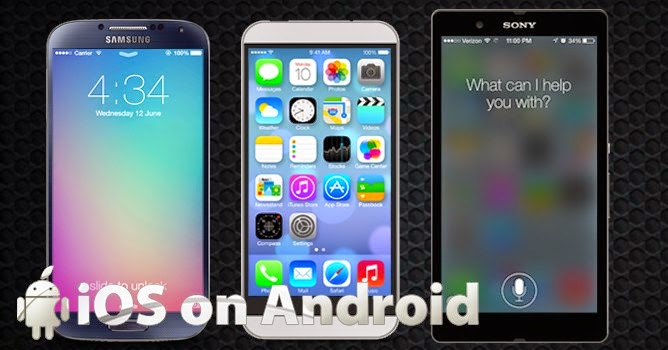
iOS on Android: How To Run iOS Operating System on Android Devices?

There are very large number of people who can afford to buy an iPhone but they go for Android phone instead of an iPhone because Apple put several limitations with iPhone. As the price of Apple iPhone is very high (many people say “overpriced”) so with so many limitations at such high price, people just can’t survive.
However, the user-interface is quite appealing and iOS available in iPhone provide several amazing features that Android devices can’t match. So basically, what people want is “An iPhone that’s not made by Apple”.

Do you also fall in same category of people who wanted to enjoy iOS features but not on Apple devices?Then, I’ll just say you dream have come true (and, I am not kidding).Talented XDA Developers have made it possible.
They have made it possible to run iROM (a port of iOS) to run on Android firmware using an “iOS virtual machine emulator”. Although, it is a workaround so you will miss few new features but it is providing several features:

What It’s Got?

Installing iROM on your Android phones or tablets will provide you several iPhone’s features on your Android devices. Some notable features are as follows:
sonymobilexperiaureview

1. iOS Notification Center

While using any app, if you got any email or message then instead of popping it right on your screen, iOS Notification Center will show a little summary of message through a small bar that appears at the top of your screen. If you swipes it down, you’ll get a list of all the “notifications” you have received. Just tap the message, and you’ll be taken to your inbox.

2. Tweet From Any App

How many time it happened that while browsing web, you have found interesting content that you want to share with your twitter friends or followers? (May be, you wanted to tweet about this review!)
So now, instead of installing any separate Twitter app, you can tweet the content directly to your friend by tapping the “Tweet” option available at your web browser. Tap Tweet, add message and tap “send”. You tweet will be instantly sent to your Twitter feed.

3. Easy Camera Access

Not just the unlock feature got iOS’s patented slide-to-unlock features but it also have a shortcut to access your camera app. Just swipe up and you’ll be taken to your default camera app to shoot pictures. Moreover, you don’t need to “tap”, even you don’t need to touch screen at all to take pictures. You can shoot the photos by pressing Volume up button.

4. Customizations

Due to iROM, you can change your background wallpaper, lock screen wallpaper and ring tone to that of iPhone. Isn’t it cool?

5. One Size Fits All App

One of the great strengths of iOS is, all the apps perfectly fits iPhone screen so in contrast with Android developers, iOS developers can easily provide consistent UI for iOS devices without concerning about screen sizes. Now, with iROM, you have this feature for your Android apps too. So developers, just take care of UI, screen will automatically adjusted.

What It’s Lack?

Well, its only iROM running on your Android so it obviously lack some features. Not important, though, but it lacks Apple App Store and Siri.

Saturday, 13 December 2014

Freedom v1.0.6 Apk : Unlimited In-App Purchases Hack on Android is Here! [LATEST]

WjhzQlNRaDJrYUUx_o_using-freedom-for-unlimited-in-app-purchases-android-
Freedom v1.0.6 Apk
Using this app, you will be able to purchase all Coins, Gems, Levels and Lives for free!! It contains an inbuilt free card, which can be used on Google Play!
How to use it?
  1. Download Freedom APK file given below
  2. Make sure that you have “Unknown sources” enabled in your security settings
  3. Install downloaded APK and launch it
  4. Allow superuser permissions request(root access)
  5. Tap on application in which you want to use free in-app purchase, wait a little. Application should start automatically
  6. Next, make your in-app purchase
Screenshots
Screenshot_2014-12-08-00-07-43
Screenshot_2014-12-08-00-08-24
Screenshot_2014-12-08-00-13-57
Screenshot_2014-12-08-00-14-03
Note: REQUIRES ROOT ACCESS!
Downloads Freedom v1.0.6 Apk (1MB) 
 Freedom v1.0.6 Apk (1MB)             Freedom v1.0.6 Apk (1MB)

Join Our Newsletter